eDistrict UP — eSathi Login, Certificate Application, Status & Download Guide (2026)
Apply for UP government certificates online, track your application and download digitally signed documents through eDistrict UP and the eSathi portal, without visiting a tehsil office.
Pick the certificates you need and how you will apply. You get the total fee, the time to plan for, the documents to keep ready and the order to do things in.
What is eDistrict UP — The Digital Backbone of UP Government Services
eDistrict UP is the official online service delivery platform of the Government of Uttar Pradesh, operated at edistrict.up.gov.in with citizen services accessible through the eSathi portal (eServices Access To Help Individuals) at esathi.up.gov.in. Through this single system, any resident of Uttar Pradesh can apply for government certificates, track their application in real time, download digitally signed documents, and verify certificates issued to others — all without visiting a tehsil or block office.
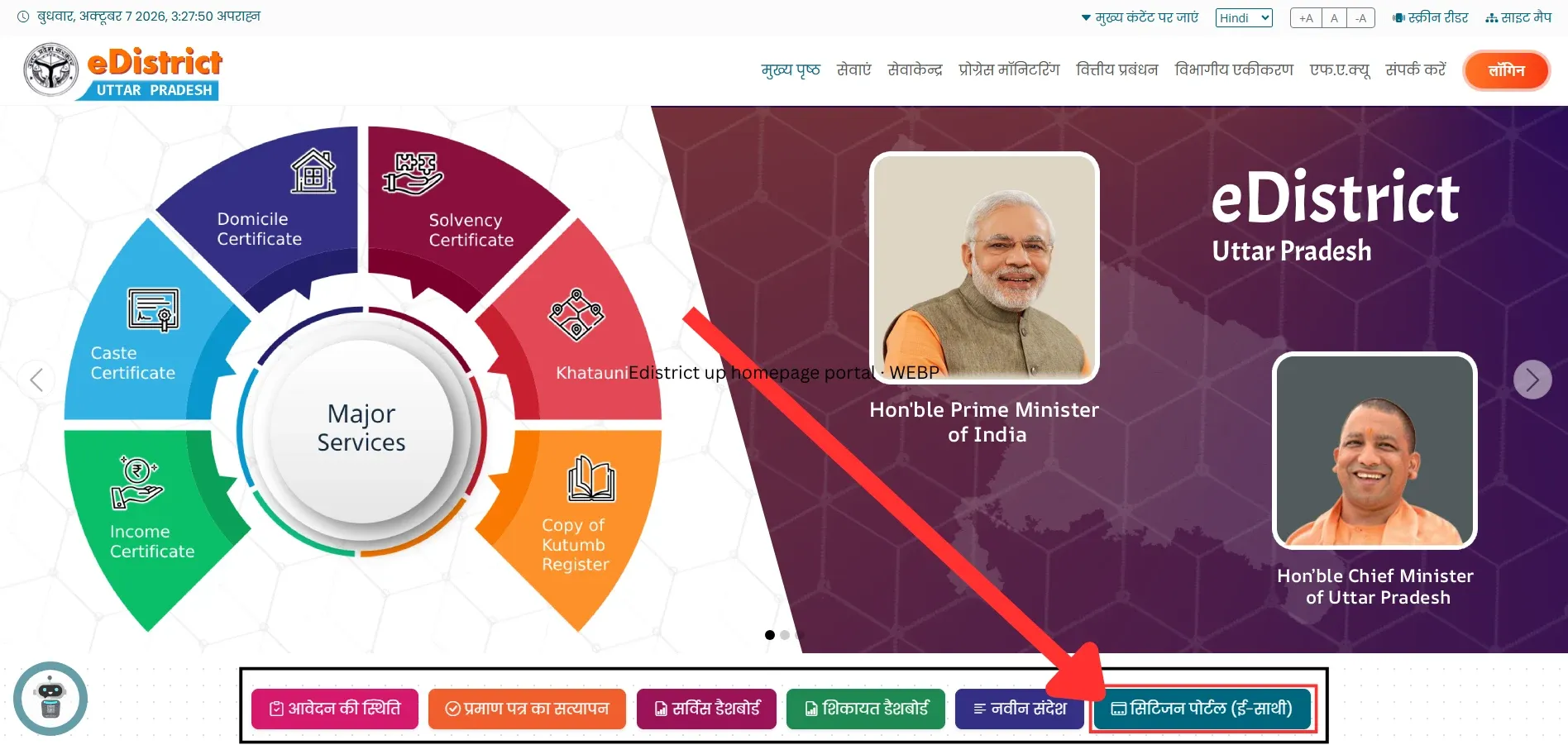
The eDistrict UP portal (edistrict.up.gov.in) homepage. Use the "सिटिजन पोर्टल (ई-साथी)" button at the bottom to reach the eSathi login.
The platform was launched in December 2008 as a pilot across 6 districts under the National e-Governance Plan (NeGP) as a State Mission Mode Project. It expanded in phases — Zone 1 brought 35 districts online, Zone 2 added 34 more — until all 75 districts of Uttar Pradesh were connected. Today, 36.90 crore certificates have been issued through the platform, with over 4 crore transactions processed every year (source: Digital India Corporation / NeGD). The technical infrastructure is developed and maintained by the National Informatics Centre (NIC) UP State Unit, headquartered at Yojna Bhawan, Lucknow, running on the UP State Data Centre, State Wide Area Network (SWAN), and State Service Delivery Gateway (SSDG).
In 2019, the platform received the Gems of Digital India Award (Analyst’s Choice) from the Digital India Corporation — recognition of its scale and impact in a state of about 24.35 crore people (National Commission on Population projection for July 2026, Census 2027 pending), the most populous in India.
Why eDistrict Matters Beyond Certificates
What most people don’t realise is that eDistrict UP is not an isolated portal — it is the entry point to almost every other UP government service. The income certificate you obtain from eDistrict is the document the UP Scholarship Saksham portal verifies through an API before releasing scholarship funds. The caste certificate is what UPPSC and UPSSSC check during document verification for government jobs. The domicile certificate is the prerequisite for NEET state quota seats if you passed 10th or 12th outside UP. The death certificate is what the revenue department needs before initiating property mutation (Varasat) on UP Bhulekh. The haisiyat (solvency) certificate requires your khatauni from Bhulekh as a supporting document.
eDistrict Online vs Tehsil Office Visit
Before eDistrict, getting a certificate meant repeated trips to the tehsil or block office, cash payments and manual follow-up. Here is how the two routes compare.
Factor
eDistrict UP (online)
Tehsil / block office (offline)
Time to apply
Minutes, from home or a CSC
Multiple office visits
Cost
₹10-15 government fee
Agent fees of ₹200-500 are common
Tracking
Real-time status with your SRN
Manual follow-up at the office
Payment
PAYGOV: UPI, net banking, debit card
Cash or stamp paper
Fixing errors
Correct and resubmit online with the same SRN
Another office visit
Certificate format
Digitally signed PDF with QR code
Paper copy with manual signature
How to Register on eSathi — New Account Setup
Every citizen needs an eSathi account before applying for any certificate. Registration is free and takes 5-10 minutes.
Open the eSathi portal
Open esathi.up.gov.in in any browser — Chrome, Firefox, or Safari on mobile works. The eSathi Android app was removed from the Google Play Store in August 2024 — use the mobile browser version instead.
You can also start from the eDistrict homepage (edistrict.up.gov.in): the “सिटिजन पोर्टल (ई-साथी)” (Citizen Portal) button below the banner opens eSathi.
From edistrict.up.gov.in, click "सिटिजन पोर्टल (ई-साथी)", the last button in the row below the banner, to reach the eSathi login.
Click New User Registration
Click “नवीन उपयोगकर्ता पंजीकरण” (New User Registration) on the login page.
Enter your details
Enter your full name (as printed on Aadhaar), date of birth, gender, residential address (district, tehsil, and village/ward), mobile number (must be linked to Aadhaar for OTP), email address, and create a login ID and password.
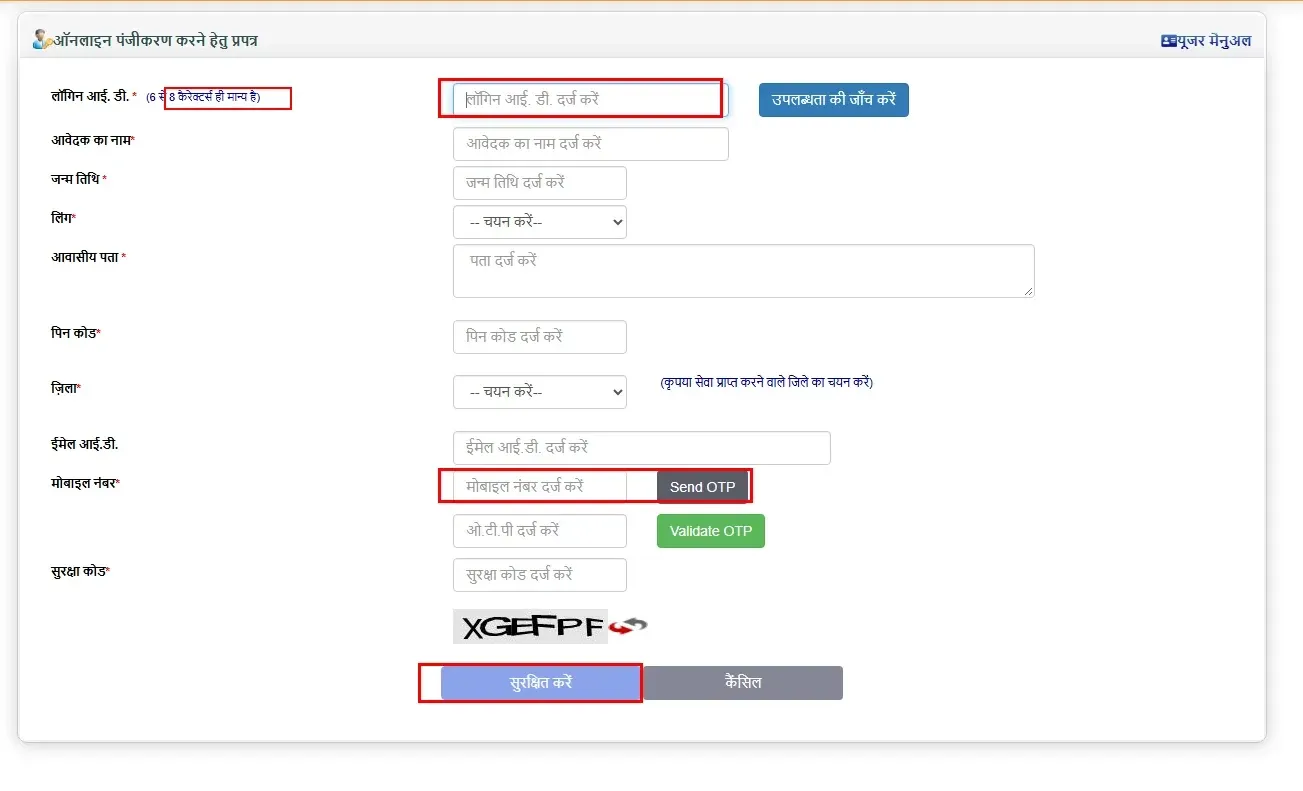
The login ID must be 6-8 characters long and alphanumeric, letters and numbers only (for example, arun2026 or raj123). Spaces and special characters are not allowed, and an ID that breaks this rule makes the registration fail.
eSathi registration form. Only login IDs of 6 to 8 characters are accepted, and the mobile number must be linked to Aadhaar.
Verify with Aadhaar OTP
A one-time password (OTP) arrives on the Aadhaar-linked mobile number. Since 2026, Aadhaar OTP verification is mandatory for all new registrations and certificate applications. If your mobile is not linked to Aadhaar in the UIDAI database, update it at the nearest Aadhaar Seva Kendra before proceeding — this step cannot be bypassed.
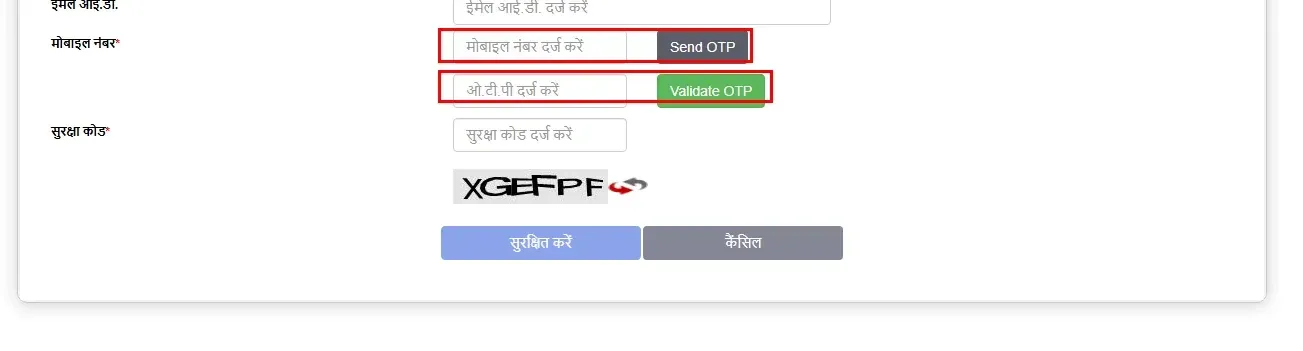
Enter the mobile number → "Send OTP" → enter the OTP → "Validate OTP" → captcha → "सुरक्षित करें" (Save).
Submit
Enter the OTP, complete the captcha, and submit. Your eSathi account is active immediately.
How to Login — And 6 Errors That Block Access
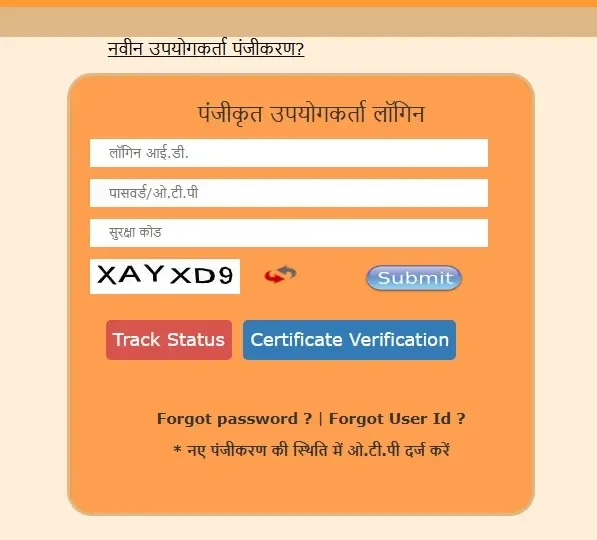
eSathi login: enter your login ID and password, solve the captcha and press Submit. "Track Status" checks status without logging in.
Go to esathi.up.gov.in, enter your login ID, password, and solve the captcha. If successful, the dashboard appears with your application history and available services.
When login fails, the error message tells you what went wrong. These are the six most common issues and exactly how to fix each one.
"Invalid Login ID"
The login ID is case-sensitive. If you registered as “arunyadav2026” but type “ArunYadav2026,” it fails. Check the exact ID you created during registration, including capitalisation.
"Wrong Password"
Use “Forgot Password” on the login page. OTP arrives on your registered mobile. If the mobile number has changed, visit the nearest CSC (Jan Seva Kendra) with your Aadhaar for manual password reset.
"Captcha Mismatch"
The distorted text image is hard to read on small mobile screens. Tap the refresh icon next to the captcha to get a clearer one. If captcha consistently fails, switch from the mobile browser to a desktop/laptop or clear your browser cache.
"Session Expired — Please Login Again"
The portal times out after approximately 15 minutes of inactivity. This is a security feature. Re-login and continue from where you stopped — unsaved form data is lost, so fill forms quickly.
"Server Busy / 503 Error"
The portal experiences heavy traffic during July-September (UP Scholarship season — 84.88 lakh applications in 2025-26, all requiring eDistrict certificates), and around major exam result dates. Try early morning (6-8 AM) or late evening (after 9 PM) when traffic is lower.
"OTP Not Received"
Aadhaar OTP depends on UIDAI servers. Wait 2-3 minutes before requesting a new OTP. Check that your mobile is linked to Aadhaar — if not, no OTP will arrive regardless of how many times you request. Network congestion in rural areas also causes delays — move to a location with stronger signal.
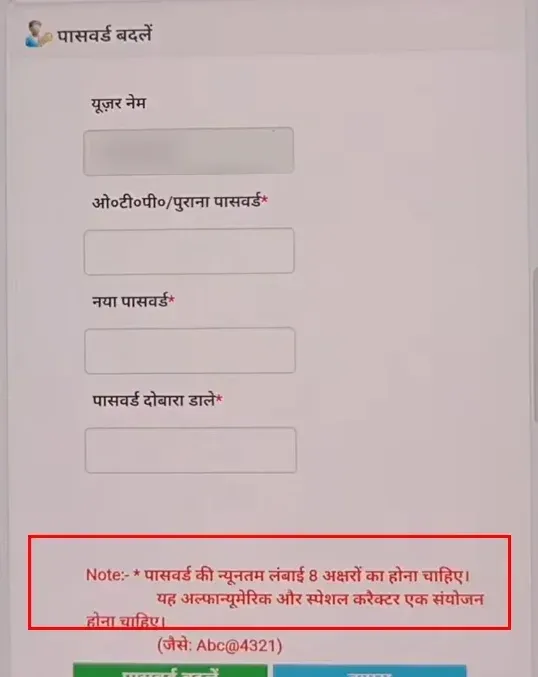
Forgot your password? Reset it with an OTP. The new password needs at least 8 characters and must combine letters, numbers and a special character (for example, Abc@4321).
Certificates Available — Fees, Documents & Processing Time
eDistrict UP offers certificates across multiple departments. The Revenue Department certificates (income, caste, domicile) are the most applied-for, but the platform covers 325+ services from 47 departments. Here are the certificates most citizens need, with the practical details that matter.
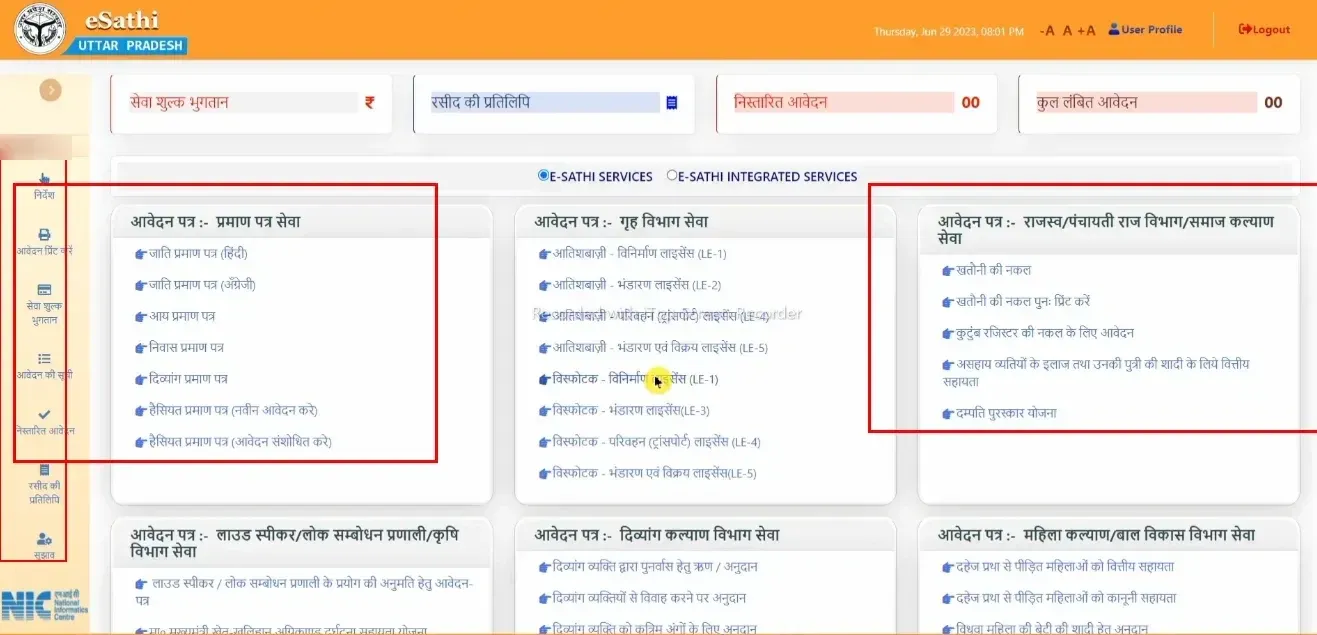
eSathi offers 325+ services from 47 departments: certificate services, Home Department (licences), Revenue/Panchayati Raj (khatauni, kutumb register), Disability Welfare and Women/Child Development.
Income Certificate
आय प्रमाण पत्र
Issued by the Tehsildar under the Revenue Department. Required for scholarship applications (UP Scholarship Saksham portal verifies it via API), EWS reservation, fee waivers, and government scheme eligibility. See our income certificate guide for what income to include, documents by applicant type and what the Lekhpal checks.
Fee
₹10-15 (eSathi) · ₹30 + facilitation (CSC)
Processing
7-15 working days (Lekhpal field verification required)
Documents
Aadhaar + self-declaration form + ration card + passport photo
Validity
3 years (official) — but UP Scholarship portal requires a fresh certificate every academic year, and EWS certificates require current financial year income proof. Apply fresh if your existing certificate is older than 1 year and you need it for scholarship or EWS purposes.
Caste Certificate
जाति प्रमाण पत्र
Issued by the Tehsildar/SDM. Required for SC/ST/OBC reservation in education (NEET, JEE, CUET), government jobs (UPSC, SSC, UPPSC, UPSSSC), and government schemes. See our caste certificate guide for the central vs state OBC list, exact caste spelling and NCL validity.
Fee
₹10-15 (eSathi) · ₹30 + facilitation (CSC)
Processing
7-15 working days
Documents
Aadhaar + self-declaration form + father's/grandfather's caste certificate (if available) + ration card
Validity
SC/ST = lifetime. OBC Non-Creamy Layer = 1 financial year (central purposes like UPSC/SSC), 1-3 years (state purposes like UPPSC; no UP order fixes this and practice varies, many recruitment notices want a certificate for the current financial year, so the notice's cutoff date decides). Check your NCL validity before every exam DV.
Domicile Certificate
निवास प्रमाण पत्र
Issued by the Tehsildar. Required for NEET state quota (85% of seats) if you passed Class 10 or 12 outside UP (if you passed both in UP, no certificate is needed, per the UP NEET UG-2026 policy GO), state university admissions, UP Scholarship, and state government job applications.
Prerequisite:UP Family ID (Ek Parivar Ek Pahchan, familyid.up.gov.in) is now mandatory. Without it, the domicile application cannot be submitted on eSathi. Creating a Family ID takes 1-2 weeks — do this first. If your family has a ration card, its number is your Family ID. See our domicile certificate guide for Mool vs Samanya Niwas and the full Family ID steps.
Fee
₹10-15 (eSathi) · ₹30 + facilitation (CSC)
Processing
7-15 working days
Documents
Aadhaar + self-declaration form + ration card + passport photo
Validity
Lifetime (but some recruitment notifications require it to be less than 3 years old)
Birth Certificate
जन्म प्रमाण पत्र
Three portals serve different records — CRS (crsorgi.gov.in) for recent hospital births (2024+), e-Nagarsewa (e-nagarsewaup.gov.in) for urban births under Nagar Nigam, and eSathi for older records across all 75 districts. RBD Act, 1969 mandates registration within 21 days (free). The RBD Amendment Act, 2023 introduced 7-day certificate issuance, digital registration, and Aadhaar linking. See our birth certificate guide for which portal to use, how UP government hospitals register births automatically, and adding the child’s name later.
Required for insurance claims (for LIC, the death certificate goes with Claim Form A, Form 3783; Form 3816 is added only if the insured was treated in hospital), EPFO benefits (Form 20 for PF, Form 10D for pension, Form 5IF for EDLI insurance up to ₹7 lakh), bank account succession, property mutation (Varasat on UP Bhulekh), pension transfer, and ration card update. Same three portals and RBD Act timelines as birth certificate. Register within 21 days — every day of delay makes the process harder. See our death certificate guide for documents by type of death and every claim that follows (Varasat, EPFO, LIC, pension).
Fee
Free (first copy) · ₹10-15 (eSathi) · ₹30+ (CSC)
Validity
Permanent
Self-Declaration Form
स्व-प्रमाणित घोषणा पत्र
A mandatory upload for income, caste, and domicile applications on eSathi. DARPG introduced it in 2014, replacing the ₹100 stamp paper affidavit — saving Indian citizens an estimated ₹8,000 crore annually (source: DoPT / Centre for Civil Society). One form covers all three certificates. Most common rejection cause: uploading it without a signature. Second most common: uploading it as PDF instead of JPEG (under 100KB). See our self-declaration form guide for the download, field-by-field filling and phone scanning.
Parivar Register Nakal
परिवार रजिस्टर नकल
Issued under the Panchayati Raj Department (not Revenue). The family register maintained by the Gram Panchayat Secretary — different from UP Family ID (familyid.up.gov.in), which is a 12-digit digital identifier with 3.06 crore IDs covering 12.63 crore beneficiaries. Parivar Register Nakal is required for ration card applications, pension claims, property succession, court proceedings, and SC/ST caste verification (1950 or earlier entries are the strongest ancestral caste proof).
Fee
₹10-15 (eSathi) · ₹5 direct from Gram Panchayat (3 working days, Model Citizen Charter)
Other Certificates
EWS Certificate (10% General category reservation — expires every March 31), Character Certificate (police/security recruitments — Tehsildar issues, not police), Haisiyat/Solvency Certificate (requires UP Bhulekh khatauni as supporting document), Transfer / Address Change Certificate (स्थानांतरण प्रमाण पत्र, Sthanantaran Praman Patra), Disability Certificate, Freedom Fighter Dependent Certificate, and 300+ more services across departments.
eSathi groups certificates into 5 categories: Caste, Income, Domicile, Other (birth, death, character, EWS) and Integrated Services (Home Department, disability, Panchayati Raj).
How to Apply for a Certificate — Step by Step
Login to eSathi
Login to eSathi at esathi.up.gov.in.
Click Fill Application
Click “आवेदन भरें” (Fill Application) on the dashboard.
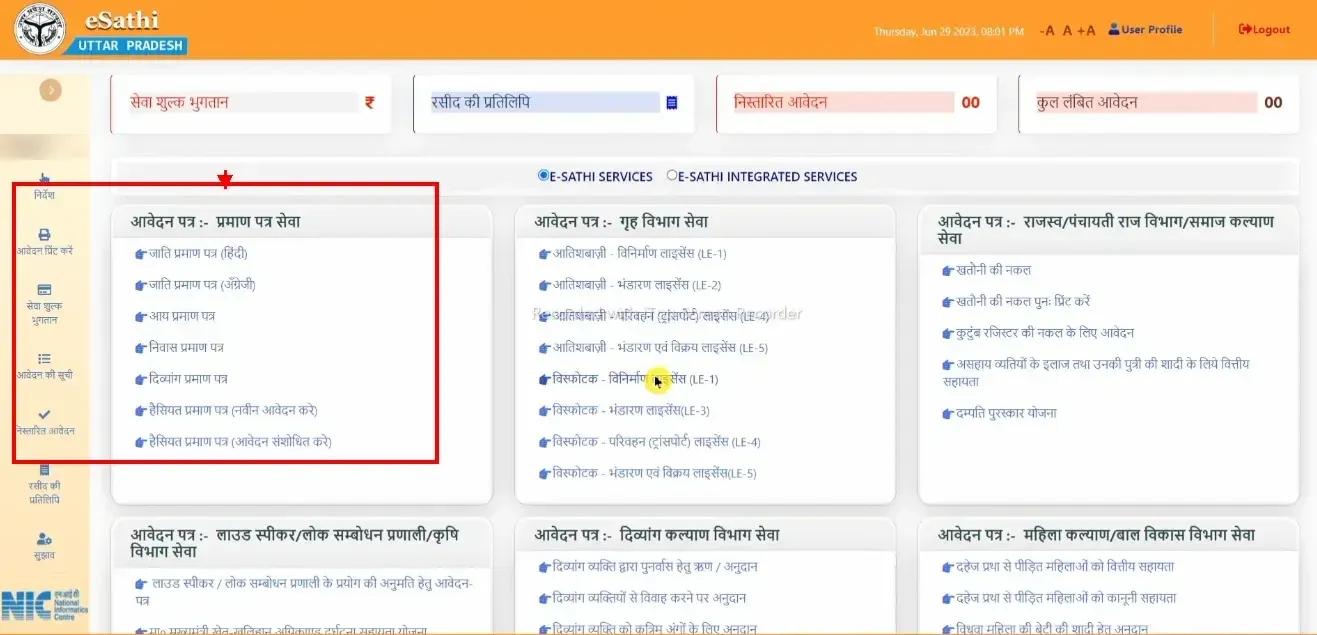
eSathi dashboard: caste, income, domicile, disability and solvency certificates are under "प्रमाण पत्र सेवा" on the left. Khatauni and kutumb register are under Revenue/Panchayati Raj on the right.
Select the department
Income, caste, domicile, EWS, character = Revenue Department (राजस्व विभाग). Parivar Register = Panchayati Raj Department (पंचायती राज विभाग). Birth and death certificates may appear under Urban Development or Panchayati Raj depending on whether the event was urban or rural.
Select the certificate
Select the specific certificate from the dropdown and click the application button.
Fill the form
Personal details, address (district, tehsil, village/ward), Aadhaar number. Some fields auto-populate from Aadhaar e-KYC. For income certificate, enter the annual household income figure — this must match exactly when verified by the Lekhpal during field visit, and you will need to enter the same figure on the scholarship form later.
Verify with Aadhaar OTP
Complete Aadhaar OTP verification. The OTP arrives on the Aadhaar-linked mobile. Mandatory since 2026.
Upload documents
Every file must be under 100KB, JPEG or PDF format. This size limit exists because most UP citizens access eSathi on mobile data with limited bandwidth. Scan in black and white at 200 DPI for the best balance of clarity and file size. Colour scans are unnecessary and consume more space.
Pay the fee
Pay ₹10-15 through PAYGOV — UPI, net banking, or debit card. Credit cards are generally not supported for government fees on PAYGOV, so a credit card attempt usually ends in a payment failure even though the portal itself is working.
Submit and note your SRN
Submit and note your Service Request Number (SRN). This is your tracking key for everything that follows.
Who Verifies Your Application — The Chain from Lekhpal to Tehsildar
This is the part no guide explains. When you submit a certificate application on eSathi, it doesn’t get approved by a computer. A real person visits your area, checks your details, and files a report. Understanding this chain explains why processing takes 7-15 days and why some applications take longer than others.
1
Lekhpal
Your area (halka), town or village · field verification
Visits your area and verifies income, residence or caste details, then files a report.
2
Revenue Inspector (Kanungo)
Circle level (within the tehsil) · review
Reviews the Lekhpal's verification report.
3
Tehsildar or SDM
Final approval
Approves and digitally signs the certificate.
The Lekhpal is the first officer in the verification chain. A revenue department field officer posted to a revenue circle (halka) that covers towns as well as villages, the Lekhpal physically visits the applicant’s area to verify income sources, residential status, or caste details depending on the certificate type. The same officer also maintains the land records that appear on the UP Bhulekh portal — khatauni, khasra, and mutation records. In 2026, UPSSSC is recruiting 7,994 new Lekhpals across UP (document verification in September 2026) — a recruitment drive driven by the massive certificate verification workload generated by eDistrict and scholarship applications.
The Revenue Inspector (Kanungo) reviews the Lekhpal’s verification report at the Revenue Inspector circle level (within the tehsil).
The Tehsildar or SDM is the final approving authority who signs the certificate with a Digital Signature Certificate (DSC). For standard certificates (income, caste, domicile), the Tehsildar approves. For some certificates and disputed cases, the SDM reviews.
How to Check Application Status
1eSathi Dashboard
Login to esathi.up.gov.in → dashboard shows all your applications with SRN, type, date and current status.
2Without Login
Go to edistrict.up.gov.in → click “आवेदन की स्थिति” → enter your SRN (Service Request Number). No login required.
What Each Status Label Means
प्रेषितSubmitted
Application received and fee paid. Waiting to be assigned to the verifying officer.
सत्यापनाधीनUnder Verification
With the Lekhpal for field verification (the Revenue Inspector may review). This is where most applications spend the majority of processing time. While the field report is pending, the status may read "लेखपाल रिपोर्ट प्रतीक्षित" (Lekhpal report awaited).
तहसीलदार को अग्रेषितForwarded to Tehsildar
Field verification is complete and the Tehsildar is reviewing the application. Good news: this is the final stage.
स्वीकृतApproved
Approved by the Tehsildar/SDM. The digitally signed certificate is being generated.
प्रमाण पत्र जारीCertificate Issued
Digitally signed and ready for download.
संशोधनाधीनPending for Correction
Not a rejection. The officer found a minor, fixable issue and sent the application back to you. Log in, read the correction note, fix the issue and resubmit under the same SRN. No new application or fee is needed.
अस्वीकृतRejected
Application rejected with a reason. Common causes: document mismatch, incomplete information, field verification discrepancy. You can re-apply after fixing the issue with no waiting period, but it is a new application: the fee is charged again, and the fee for the rejected application is not refunded.
How to Download Your Certificate
Once the status shows “प्रमाण पत्र जारी,” the digitally signed PDF is available for download.
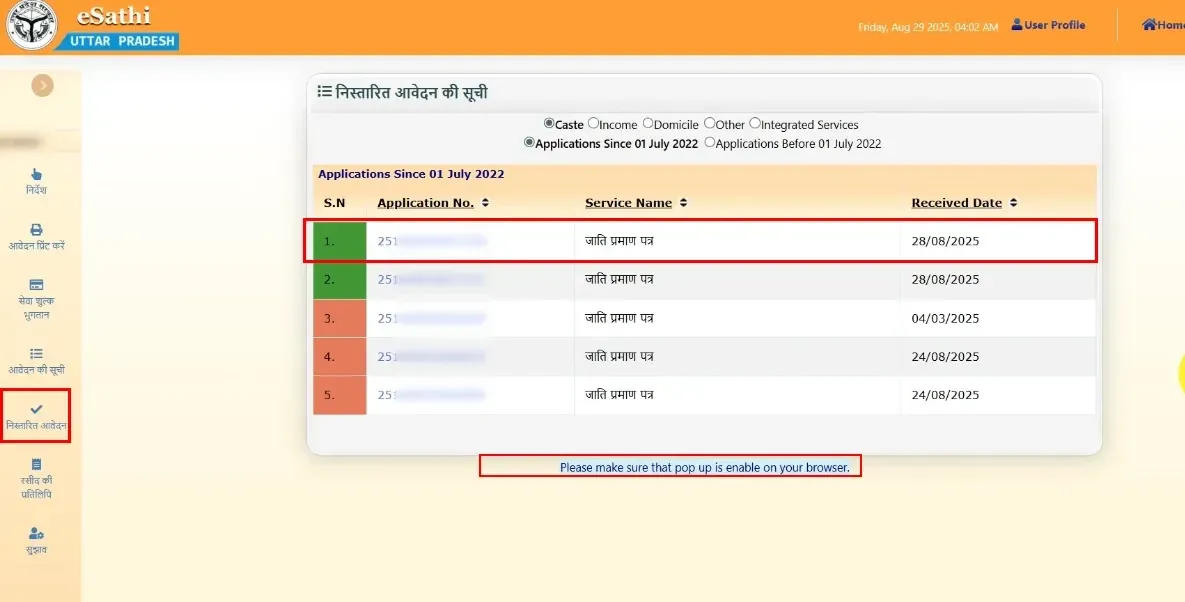
"निस्तारित आवेदन" (completed applications) lists your issued certificates. Click the application number to download the PDF, and keep browser popups enabled, as the note below the list says.
PDFFrom eSathi
Login → “निस्तारित आवेदन” (completed applications) in the left menu → click the application number → download PDF. The PDF includes a Certificate Number, QR code, and digital signature of the Tehsildar/SDM. Print unlimited copies — each printed copy is equally valid because the QR code and digital signature are verifiable.
AppFrom DigiLocker
Certificates issued through eDistrict UP are integrated with DigiLocker (digilocker.gov.in) — the Government of India’s digital document wallet with 72.43 crore registered users and 900 crore+ issued documents nationwide. Access through the DigiLocker app or website using your Aadhaar-linked mobile. Educational institutions, Passport Seva Kendras, and many government offices accept DigiLocker-linked certificates directly without requiring a physical copy.
✓Verification by Third Parties
Anyone can verify an eDistrict UP certificate at edistrict.up.gov.in → “प्रमाण पत्र का सत्यापन” → enter the Certificate Number. The system confirms whether the certificate is genuine, displays the issue date, and shows the issuing officer’s details.
Certificate Not Downloading?
If you click download and nothing happens, the cause is usually one of these:
Certificate not generated yet. Check the status first. Download works only after it shows “प्रमाण पत्र जारी”.
Browser compatibility. Try Google Chrome if another browser does nothing.
Popup blocker. Allow popups for the portal, since the PDF often opens in a new window.
Slow connection. The download can time out on weak mobile data. Retry on a stronger connection.
Wrong Details on an Issued Certificate
Correcting a certificate that has already been issued is different from fixing a rejected application. There is no online correction for an issued certificate. If the name, father’s name, date of birth or address is wrong, visit the issuing Tehsildar or SDM office in person with supporting documents such as Aadhaar, a marksheet or other proof of the correct details. In many cases you will need to apply fresh on eSathi with the correct details, and the new certificate then replaces the old one.
The CSC Alternative — Jan Seva Kendra
Citizens who cannot apply online — due to lack of internet, smartphone, or digital literacy — can visit any Common Service Centre (CSC), also called Jan Seva Kendra. India has 6.5 lakh+ CSCs under the MeitY Digital India initiative, with UP operating the largest state network. Every block has at least one CSC, and many gram panchayats have their own.
Channel
Government Fee
Additional
Total
eSathi (self-service)
₹10-15
None
₹10-15
CSC (Jan Seva Kendra)
₹30
₹30-50 facilitation
₹60-80
The CSC operator fills the form, uploads documents, and submits on your behalf. You receive the SRN for tracking. The processing timeline is identical — 7-15 working days regardless of whether you applied through eSathi or CSC. The only difference is cost.
Common Rejection Reasons — 8 Problems and Fixes
1Self-declaration form uploaded without signature
The most common rejection on the portal. The form is filled and scanned but the signature field at the bottom is blank. Sign before scanning.
2Aadhaar name doesn't match the application name
e-KYC auto-fills from Aadhaar. Manually overriding the name (adding a middle name, different spelling) creates a mismatch. Use the exact name printed on your Aadhaar card.
3Income figure on certificate doesn't match scholarship form
The Saksham portal API cross-checks the income on your eDistrict certificate against what you entered on the scholarship form. Even ₹1 difference triggers a “Data Mismatch” error. Copy the exact figure.
4OBC NCL certificate expired
For central recruitments (UPSC, SSC, Railway), NCL must be from the current financial year. Certificates from the previous year are invalid after April 1.
5Domicile application submitted without Family ID
Since the Family ID (familyid.up.gov.in) became a mandatory prerequisite, domicile applications without it fail at submission. Create your Family ID first — it takes 1-2 weeks.
6File size exceeds 100KB or wrong format
Each upload must be under 100KB in JPEG or PDF. Phone camera photos in high resolution exceed this limit. Scan in black and white at 200 DPI, or use a compression app before uploading.
7Lekhpal could not verify — applicant not found at address
The Lekhpal visited the address and couldn’t locate anyone. This happens when the registered address is different from the current residence, or when the Lekhpal visits during working hours when everyone is away. Ensure the address is accurate and that someone is home to confirm details if the Lekhpal visits.
8Delayed registration (birth/death) without required permissions
21 days = free. 22-30 days = late fee. 31 days-1 year = District Registrar permission. After 1 year = magistrate order. Submitting without the permission matching your time bracket causes automatic rejection.
Your Legal Right — Janhit Guarantee Act
UP Government Portal Directory — What Connects to eDistrict
eDistrict UP doesn’t exist in isolation. It is one node in a network of UP government portals, and certificates from eDistrict are required by almost every other portal. Here is how they connect.
Land records (khatauni, khasra, bhu-naksha) at upbhulekh.gov.in. Property mutation (Varasat) after a landowner’s death requires the death certificate from eDistrict. The haisiyat certificate on eDistrict requires khatauni from Bhulekh. The Lekhpal who verifies your eDistrict application is the same officer who maintains Bhulekh land records.
Scholarship portal at scholarship.up.gov.in serving 2.5 crore+ students. 84.88 lakh applications in 2025-26 — every one requires income + caste + domicile certificates from eDistrict, verified through API. The July-September traffic spike on eDistrict is driven by scholarship deadlines.
Stamp and registration portal at igrsup.gov.in. Property registration, stamp duty, encumbrance certificate, marriage registration. Death certificate from eDistrict needed for property transfers.
Ek Parivar Ek Pahchan at familyid.up.gov.in. 3.06 crore IDs covering 12.63 crore beneficiaries. Now mandatory for domicile certificate on eSathi. Different from Parivar Register Nakal.
The revenue field officer who verifies your eDistrict applications. 7,994 new vacancies in 2026 under UPSSSC. The Lekhpal also maintains land records on Bhulekh.
Quick Reference
Detail
Information
Official Portal
edistrict.up.gov.in
Citizen Login
esathi.up.gov.in
eSathi Full Form
eServices Access To Help Individuals
Old URL
edistrict.up.nic.in (no longer works — use edistrict.up.gov.in)
Total Certificates Issued
36.90 crore+
Annual Transactions
4 crore+
Services
325+ across 47 departments
Districts
75 (all UP)
Launched
December 2008
Technical Coordinator
NIC UP State Unit, Yojna Bhawan, Lucknow
Framework
National e-Governance Plan (NeGP) — State Mission Mode Project
₹250/day on the officer, up to ₹5,000; compensation only if the appellate authority orders it (Janhit Guarantee Act)
eSathi App
Removed from Play Store Aug 2024 — use mobile browser
Login ID Format
6-8 characters, alphanumeric
Re-apply After Rejection
Allowed, no waiting period — new fee applies
Helpline
0522-2304706
CSC Helpline
14599
Frequently asked questions
What is eDistrict UP?
eDistrict UP is the official online service delivery platform of the Government of Uttar Pradesh for citizen certificates and government services. Operated at edistrict.up.gov.in with citizen login at esathi.up.gov.in, it covers all 75 districts with 325+ services from 47 departments. Over 36.90 crore certificates have been issued since its launch in December 2008. The platform is built by the National Informatics Centre (NIC) UP State Unit under the National e-Governance Plan.
Is edistrict.up.nic.in the same as edistrict.up.gov.in?
They were the same portal, but only edistrict.up.gov.in works today. edistrict.up.nic.in was the older NIC address and still appears in some older references and government documents, but it no longer resolves (checked October 2026). If an old bookmark or link uses .nic.in, type edistrict.up.gov.in instead.
How do I register on eSathi?
Go to esathi.up.gov.in → "नवीन उपयोगकर्ता पंजीकरण" → enter name, DOB, address, Aadhaar-linked mobile number, email, login ID (6-8 characters, letters and numbers only), password → verify OTP → registration complete. The mobile number must be linked to Aadhaar in the UIDAI database — OTP verification is mandatory since 2026.
How much does a certificate cost?
₹10-15 through eSathi (self-service). ₹30 government fee + ₹30-50 facilitation through CSC (Jan Seva Kendra). The fee is the same for income, caste, domicile, birth, death, and most other certificates.
How long does processing take?
7-15 working days for standard certificates. Revenue certificates (income, caste, domicile) require Lekhpal field verification, which is the primary bottleneck. Processing is slower during July-September when scholarship-related applications flood the system.
How do I check my application status?
Login to eSathi dashboard to see all applications, or go to edistrict.up.gov.in → "आवेदन की स्थिति" → enter your SRN. No login needed for the second method.
Can I apply for multiple certificates at once?
Yes. Income, caste and domicile can all be applied for on the same day. Each is a separate application with its own ₹10-15 fee, and there is no limit on applications running at the same time. They are processed independently, so if you need all three for a scholarship or exam document verification, apply for them together instead of waiting for one to finish.
My certificate has wrong details. How do I correct it?
There is no online correction for a certificate that has already been issued. Visit the issuing Tehsildar or SDM office with supporting documents (Aadhaar, marksheet or other proof of the correct details). In many cases you will need to apply fresh on eSathi with the correct details, and the new certificate then replaces the old one. Check every detail as soon as you download, so there is time to fix it before you need the certificate.
Is the digital certificate valid for passport and court?
Yes. Digitally signed certificates with QR code are legally valid across India under Section 5 of the IT Act, 2000. Passport Seva Kendras, courts, banks, and all government offices accept them without additional attestation.
What is the eSathi app? Why can't I find it?
The eSathi Android app was removed from the Google Play Store in August 2024. Use the mobile browser version at esathi.up.gov.in instead — it works identically on any smartphone browser.
Who verifies my certificate application?
The Lekhpal (revenue field officer) of your area (halka) conducts physical verification, in towns as well as villages, the Revenue Inspector (Kanungo) reviews at circle level (within the tehsil), and the Tehsildar or SDM digitally signs and issues the certificate. The same Lekhpal also maintains land records on UP Bhulekh.
What is the difference between Family ID and Parivar Register?
UP Family ID (Ek Parivar Ek Pahchan, familyid.up.gov.in) is a 12-digit digital household identifier launched February 2023 — used for scheme eligibility and DBT. Parivar Register Nakal is the traditional family register maintained by the Gram Panchayat Secretary under the UP Panchayat Raj Act, 1947 and the UP Panchayat Raj (Maintenance of Family Registers) Rules, 1970 — a physical register with entries dating back decades, used for legal proof of family structure in courts, property cases, and caste verification.
My income certificate was rejected by the scholarship portal. Why?
The UP Scholarship Saksham portal verifies your income certificate directly against the eDistrict database via API. If the income figure on the certificate doesn't match what you entered on the scholarship form — even by ₹1 — it triggers a "Data Mismatch" error. Apply for a fresh certificate with the correct income figure, then update the scholarship form to match exactly.
Can I apply for certificates in other states through this portal?
No. eDistrict UP serves only Uttar Pradesh residents across the state's 75 districts, 18 divisions, and 358 tehsils. Other states have their own eDistrict portals under the same national framework.
Can I apply from outside UP or from abroad?
Yes. The application is online and can be submitted from anywhere with internet, including another state or another country. Field verification, however, happens at the UP address you give, so you must have a valid residential address in Uttar Pradesh. NRIs can apply if they have a UP address, and the Lekhpal verifies the details at that address.
What is the Janhit Guarantee Act?
The UP Janhit Guarantee Adhiniyam, 2011 guarantees time-bound delivery of 382 government services across 45 departments. If the designated officer delays beyond the prescribed timeline without good reason, Section 7 imposes a penalty on that officer of ₹250 per day of delay, up to ₹5,000 (₹500-5,000 if the service is not provided at all). Compensation to the applicant is not automatic: the second appellate authority may order it, paid out of the penalty and not more than it. Most eDistrict revenue certificates fall under this Act. File complaints through edistrict.up.gov.in → शिकायत section. First appeal within 30 days of the deadline lapsing (SDM/ADM), second appeal within 60 days.
All guides
All UP government guides
Every guide shows how it connects to your eDistrict certificates.