1Check khatauni
upbhulekh.gov.in → “भूलेख सेवाएं” → “खतौनी (अधिकार अभिलेख) की नक़ल देखें” → district → tehsil → village → search by gata, khata, name, land category or mutation date → view/download.
2Real-time khatauni
upbhulekh.gov.in → “Real Time खतौनी की नकल देखें” → the same steps.
3Bhu Naksha (land map)
upbhunaksha.gov.in → district → tehsil → village → khasra number → view the plot on the map.
4Vaad grast (dispute check)
upbhulekh.gov.in → “भूखंड वादग्रस्त स्थिति” → district → tehsil → village → khasra → check.
What is UP Bhulekh
Bhulekh, from “Bhu” (भू, land) and “Lekh” (लेख, record), is the official digital land records portal of Uttar Pradesh, at upbhulekh.gov.in. It is operated by the Board of Revenue (Rajaswa Parishad), Uttar Pradesh, with the National Informatics Centre (NIC), and it brings every land record in the state online: khatauni (ownership records), khasra (plot-level details), bhu-naksha (cadastral maps), mutation status, dispute status and sale history.
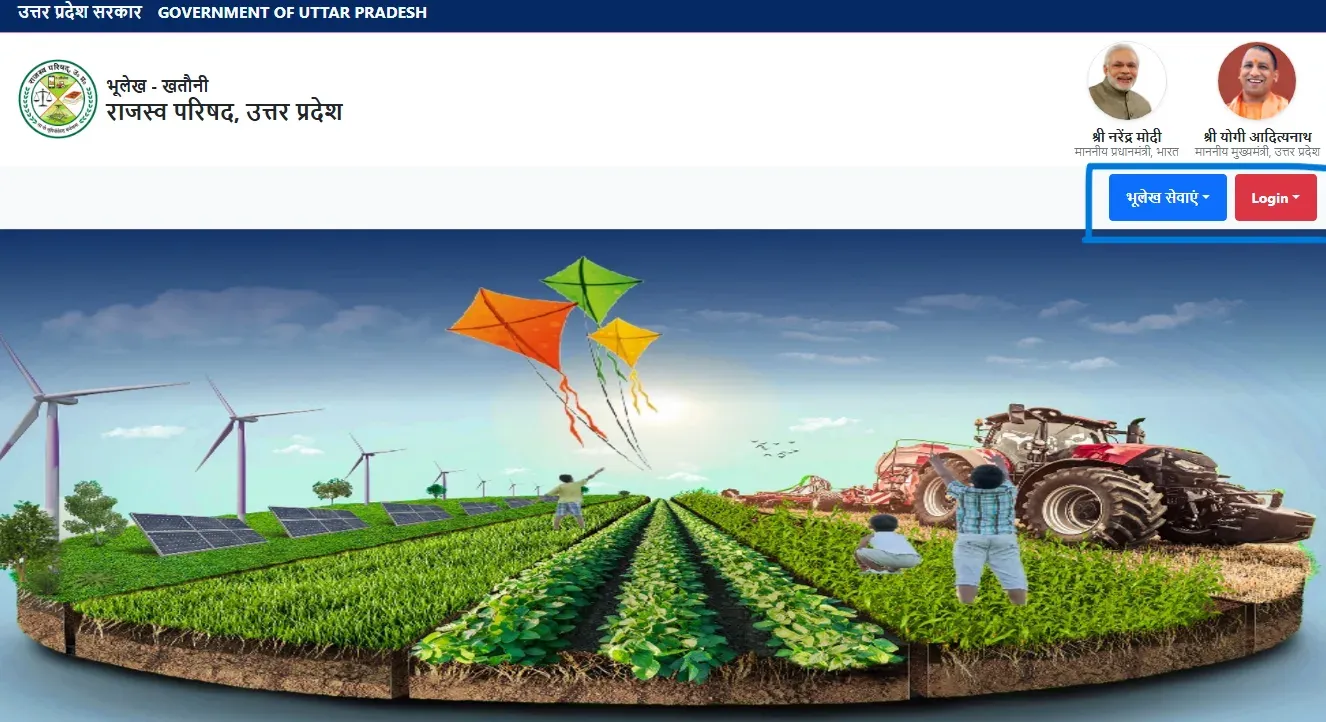
The portal went live on May 2, 2016 under the Digital India Land Records Modernization Programme (DILRMP). Before that, checking your land record meant visiting the tehsil office, standing in queues and depending on the village Lekhpal, the revenue officer who kept the physical registers (bahi-khatas) by hand. Records were sometimes inaccurate, and fraud was hard to detect. Today over 2 crore land parcels across all 75 districts and 358 tehsils are digitised, with 95% of agricultural land records computerised by 2025-26. Use has grown fast: registered users rose from 1.8 crore (2023) to 2.1 crore (2024) and 2.6 crore (2025), and online khasra downloads crossed 12.5 crore in 2025 alone (source: National Land Records Modernisation Programme 2024-25).
All 9 Services on the Portal
| # | Service | What it does |
|---|---|---|
| 1 | खतौनी (अधिकार अभिलेख) की नकल | View the ownership record (Record of Rights), the main service |
| 2 | Real Time खतौनी की नकल | Live ownership record that shows the latest mutations |
| 3 | राजस्व ग्राम खतौनी का कोड / भूखंड Unique Code | Find the 6-digit revenue village code (Census 2011 + revenue updates) and the plot’s unique code, useful for legal documents and government correspondence |
| 4 | भूखंड/गाटे के विक्रय की स्थिति | Check whether a plot has been registered for sale through IGRSUP |
| 5 | भूखंड/गाटे के वादग्रस्त होने की स्थिति | Check whether a plot is tied up in a revenue court dispute |
| 6 | खतौनी अंश-निर्धारण की नकल | View share determination: how ownership is split among co-owners |
| 7 | राजस्व ग्राम सार्वजनिक सम्पत्ति | View village public property records (ponds, commons, paths) |
| 8 | निष्क्रांत संपत्ति | Evacuee property records: land left by people who migrated during Partition |
| 9 | Real Time खतौनी Dashboard | Overview dashboard of real-time mutation activity |
All nine services can be viewed free without a login. Certified copies (legally valid, with a verification code), mutation applications and grievance submissions need a registered login on the portal.
How to Check Khatauni Online — Step by Step
The khatauni (खतौनी), officially called “Adhikar Abhilekh” (Record of Rights), is the main ownership document. It lists every plot a person owns in a specific village, with the area, share percentage and legal rights recorded against each plot.
-
Open the portal
Open upbhulekh.gov.in in any browser. Chrome works best on mobile.
-
Open the khatauni copy
Click “भूलेख सेवाएं” (Bhulekh services) and choose “खतौनी (अधिकार अभिलेख) की नक़ल देखें”.
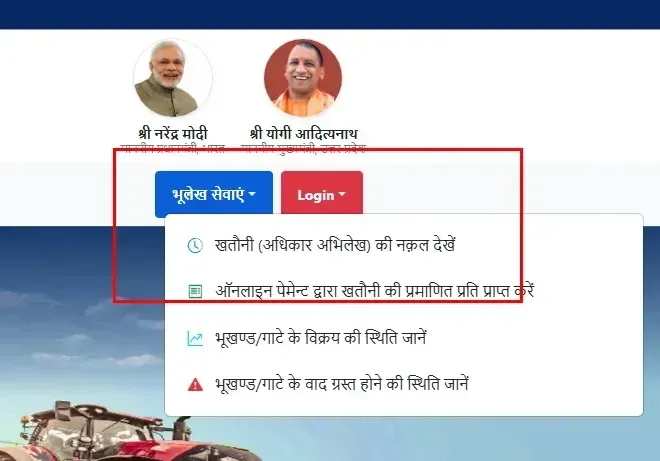
The "भूलेख सेवाएं" menu has four options: view the khatauni copy, get a certified copy by online payment, plot sale status, and plot dispute (वाद ग्रस्त) status. -
Enter the captcha
If a captcha code is shown, type it in. If it is hard to read, click the refresh icon next to it for a clearer one.
-
Select your district
Pick your district (जनपद) from the list, or type its name in “Search District”. All 75 UP districts are listed, in English with the Hindi name alongside.
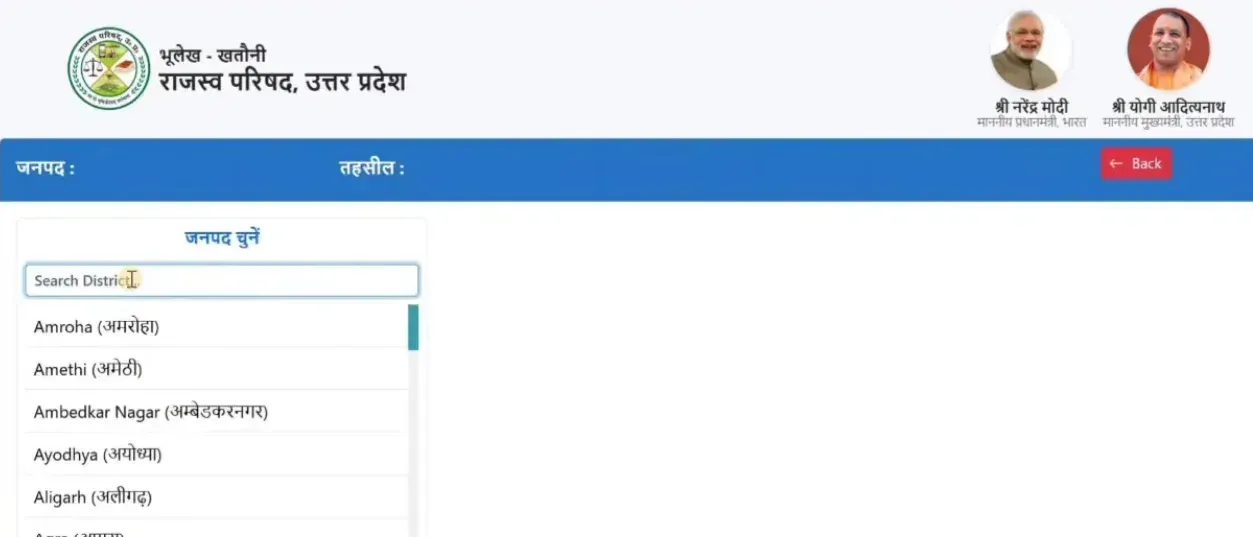
Step 4: choose the district (जनपद चुनें). Typing in the search box filters the list. -
Select your tehsil
Pick your tehsil (तहसील). The list shows only the tehsils of the district you chose.
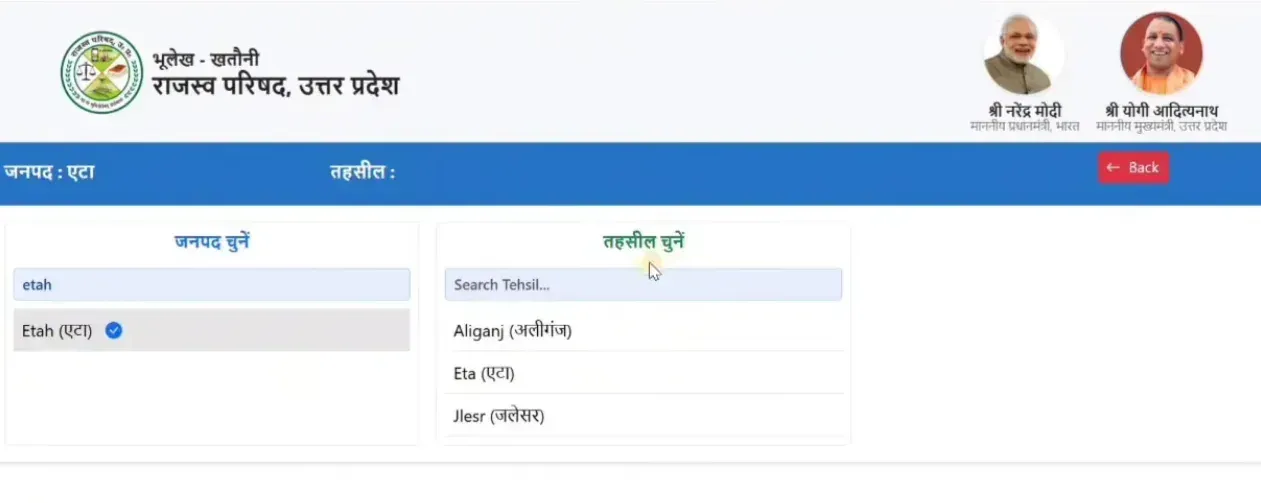
Step 5: after the district (here Etah), choose the tehsil (तहसील चुनें). -
Select your village
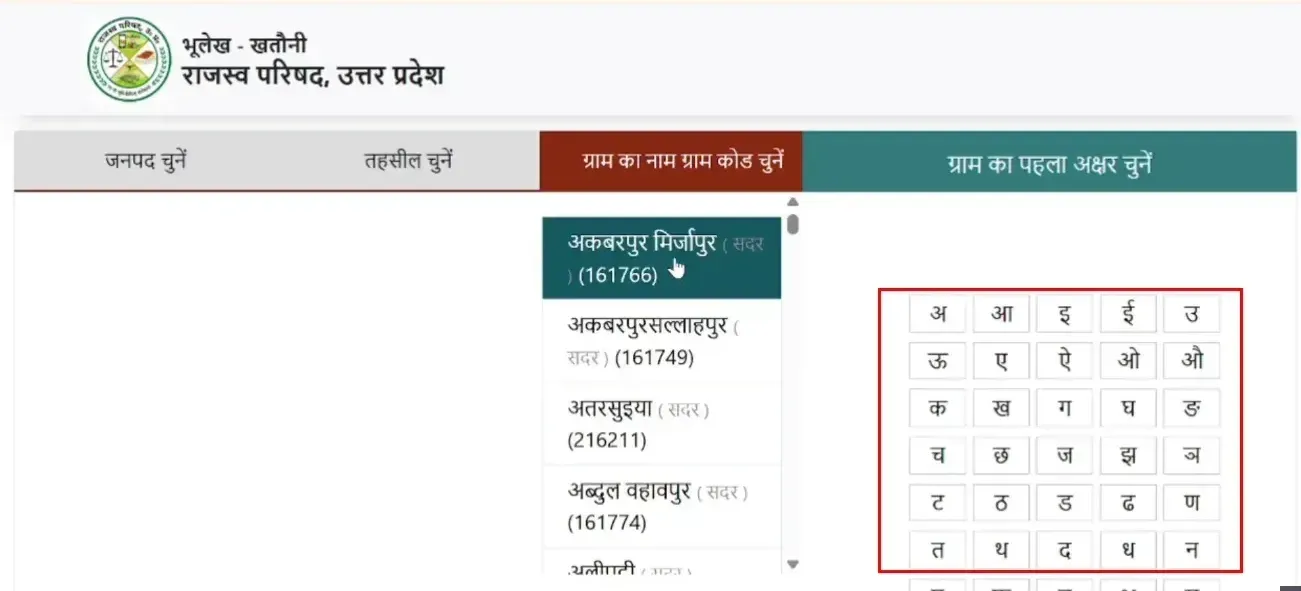
Pick your village (ग्राम) by name or by its village code, or pick the first Hindi letter of its name. If your village doesn’t appear, check that you selected the correct tehsil, because tehsil boundaries were reorganised in several districts between 2020 and 2024.
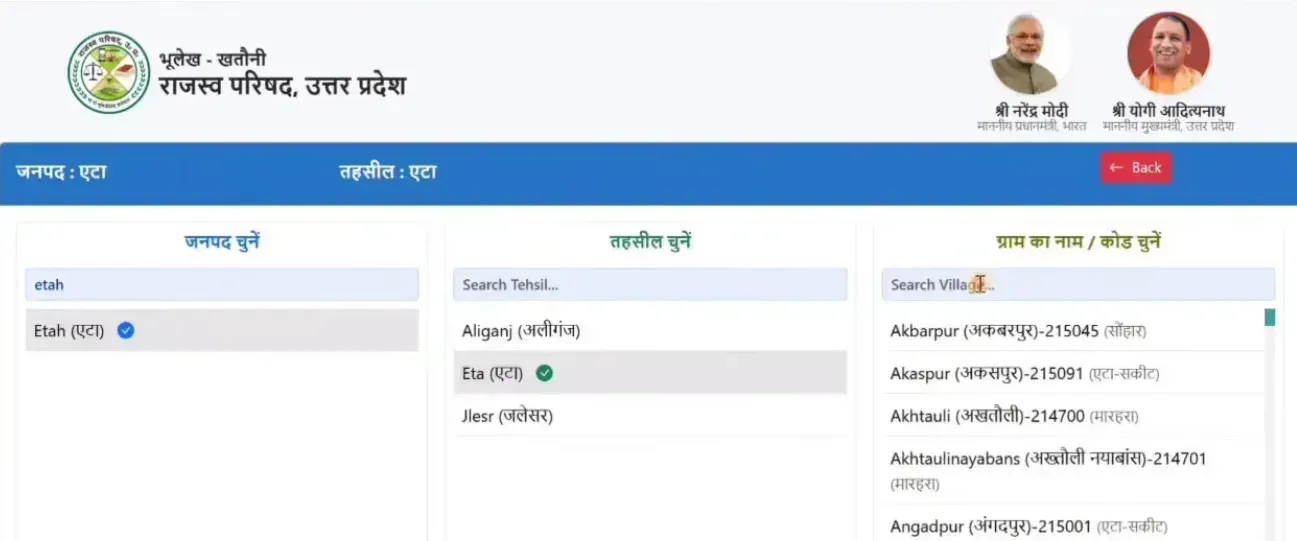
Step 6: with district and tehsil chosen, pick the village (ग्राम का नाम / कोड चुनें). Each village shows its 6-digit village code. -
Choose how to search
At the top, the “वर्तमान खतौनी/पुरानी फसली वर्ष” box lets you choose the current khatauni or an older fasli year. Below it are five search tabs:
Search tab When to use Khasra/Gata number (खसरा/गाटा संख्या द्वारा खोजें) You know your plot number. The most precise option. Khata number (खाता संख्या द्वारा खोजें) You know your account number. Shows every plot under that account. Owner name (खातेदार के नाम द्वारा खोजें) You know the owner’s name. Type the first few characters in Hindi. Land category (भूमि श्रेणी द्वारा खोजें) Search by the land’s category (श्रेणी) in the revenue records. Mutation date (नामांतरण दिनांक से खोजें) Search by the date of a mutation (namantaran). Most guides mention only the first three. The last two help when you have no plot or khata number: search by land category if you know the land’s class (for example 1-क), or by mutation date if you know roughly when the land changed hands, such as after a sale or Varasat.
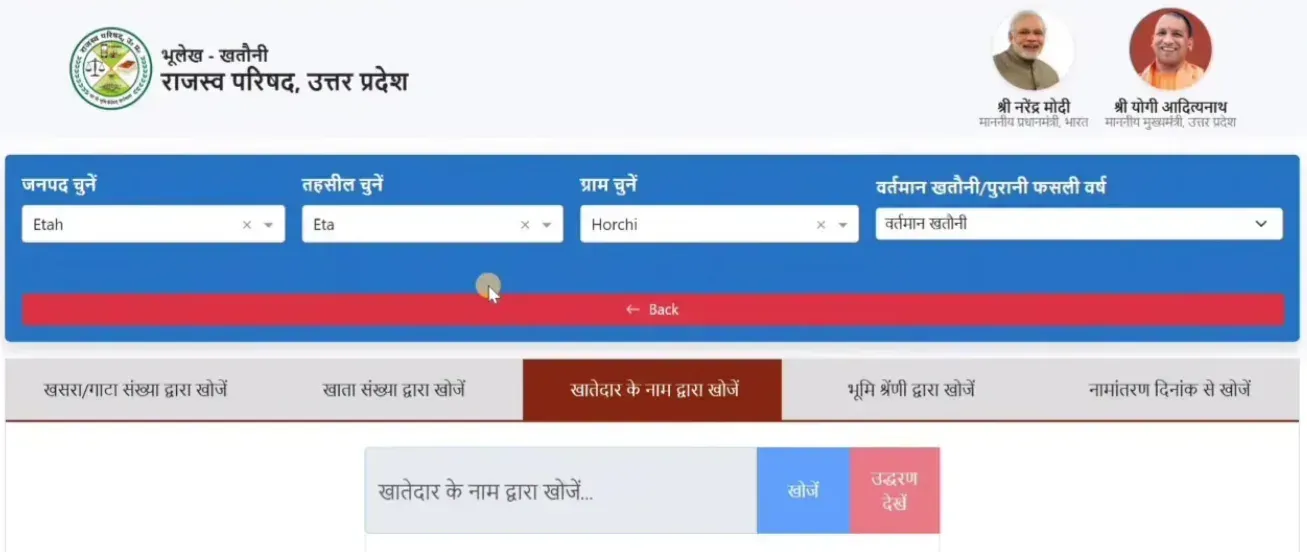
Step 7: the five search tabs, here with search by owner name (खातेदार के नाम द्वारा खोजें) selected. The right-hand box picks the current khatauni or an older fasli year. -
Search and pick the plot
Enter the value and click “खोजें” (Search). The results list each matching plot with its unique code and area. If a plot has been split, its parts appear separately (for example 414अ and 414ब). Select the one you want and click “उद्धरण देखें”.
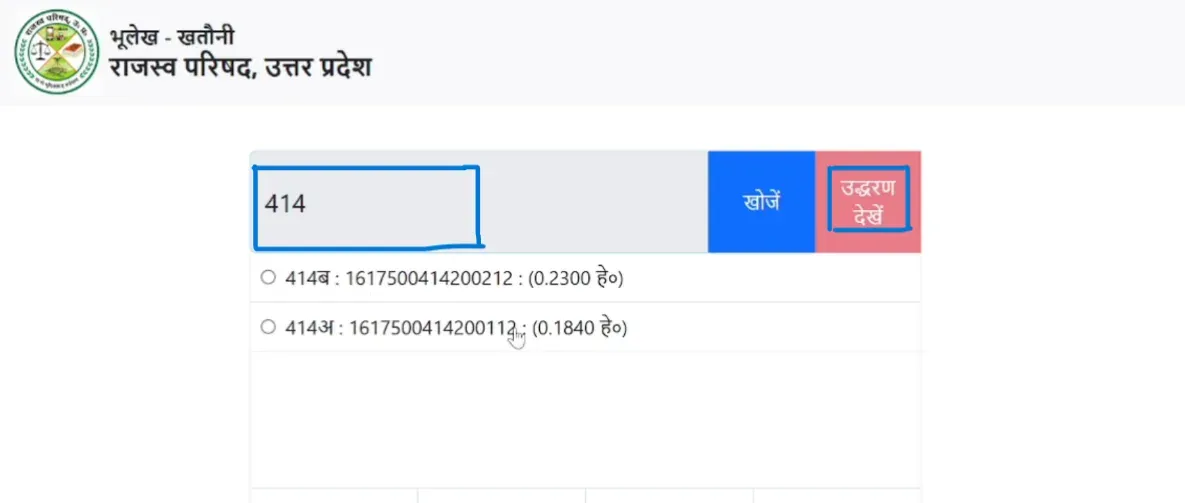
Step 8: a search for gata 414 returns two parts, 414ब and 414अ, each with its 16-digit unique code (यूनीक कोड) and area in hectares. -
Read the khatauni
The khatauni shows the owner’s name, father’s name, every khasra/gata number under that khata, the area of each plot (in hectares, and in bigha-biswa where shown), the share percentage, the land category (श्रेणी) and any recorded orders or notes. Khasra numbers shown in red can be clicked to open that plot’s status: dispute (वाद ग्रस्त), sale (विक्रय), map (भू-नक्शा) and mutation register (नामांतरण बही).
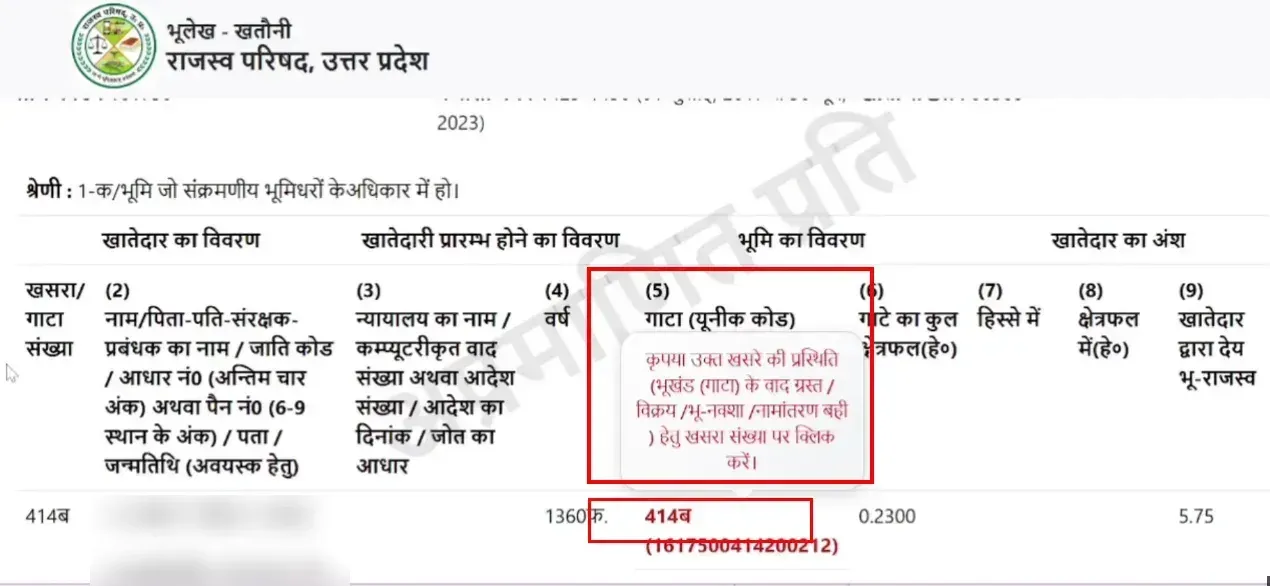
Step 9: the khatauni (owner names blurred). The tooltip says to click the red khasra number to see the plot's dispute, sale, map or mutation status. The category line reads 1-क: land held by bhumidhars with transferable rights. -
View, download or print
The record opens as “उद्धरण खतौनी (अप्रमाणित प्रति)”, an uncertified extract. Its header shows the district, tehsil, village, village code, fasli years and khata number. Download or print it with your browser’s print function (Ctrl+P on desktop, Share → Print on mobile).
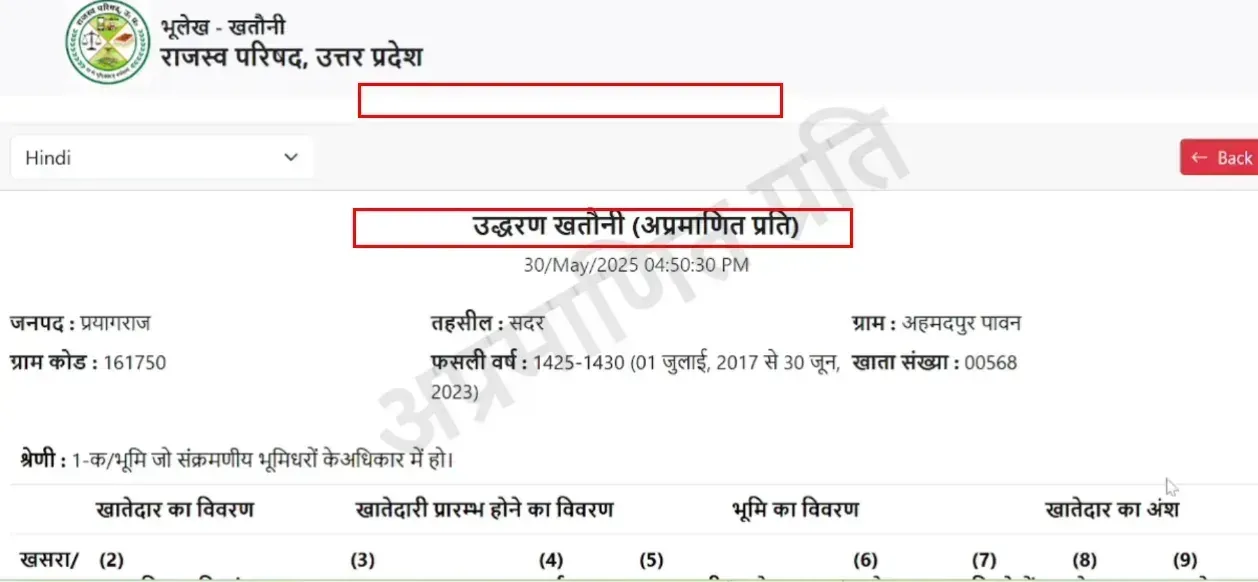
Step 10: the extract is headed उद्धरण खतौनी (अप्रमाणित प्रति), an uncertified copy. This one covers fasli years 1425-1430 (1 July 2017 to 30 June 2023).
Real-Time Khatauni — What’s Different and How to Check
The portal offers two types of khatauni. Knowing the difference prevents confusion and saves trips to the tehsil office.
Regular khatauni (अधिकार अभिलेख) updates on the fasli year cycle. The fasli year (फसली वर्ष) is the revenue calendar used across UP’s land records. It runs from July 1 to June 30, in step with the kharif (monsoon) and rabi (winter) crop seasons rather than the January-December calendar. Fasli year 1433 ran from July 2025 to June 2026, so the current year is 1434 (July 2026 to June 2027). The regular khatauni takes in mutations only when the fasli year closes, so a mutation approved mid-year won’t show here until the next cycle.
Fasli year converter
The fasli year runs from 1 July to 30 June. Find the fasli year of any date, or turn a fasli year from your khatauni into English calendar dates.
A guide based on the 1 July to 30 June fasli year. The fasli year printed on your khatauni is the one that counts.
Real-time khatauni (रियल टाइम खतौनी) updates live. The moment the Tehsildar or SDM approves a mutation (namantaran/dakhil kharij), the record shows the new owner. This is the version with the most current state of any land parcel.
How to check: upbhulekh.gov.in → “Real Time खतौनी की नकल देखें” → the same district, tehsil, village and search steps as the regular khatauni.
Plot status in either view: a khasra number shown in red is clickable. Clicking it opens that plot’s status, including vaad grast (dispute), sale, map and mutation register. If the plot is tied up in a revenue court case, this is where you see it.
| Factor | Regular khatauni | Real-time khatauni |
|---|---|---|
| Updates | Fasli year cycle (annual) | Live, as mutations are approved |
| Shows a new owner | After the fasli year ends | Immediately after the Tehsildar/SDM order |
| Shows dispute status | Yes: click the red khasra number | Yes: click the red khasra number |
| Best for | Court submissions, bank loans (with certified copy) | Quick ownership check, due diligence before buying |
| Legal weight | Higher (with certified copy from tehsil) | Informational: latest data, but not certified |
Terminology — Khatauni vs Khasra vs Khata vs Gata
These terms confuse almost everyone. Here is what each one means.
Khatauni (खतौनी)
The ownership record. It lists all plots owned by one person (or family) in a specific village, like an account statement of your land holdings. This is the document people mean when they say “check my land record”.
Khasra (खसरा)
The plot-level register. Every plot in the village has an entry with its area, soil type, current crop and owner, like an identity card for the plot. The khasra nakal (copy) for seasonal (fasli) crop records is on ekhasra.up.gov.in.
Khata (खाता)
The account number. It groups all the khasra plots that belong to one owner. One khata can contain several khasra/gata entries.
Gata Sankhya (गाटा संख्या)
The plot number: the unique number of each land parcel, and what you enter when searching by plot on Bhulekh. People use “khasra number” and “gata number” interchangeably, though they serve slightly different purposes in the revenue system.
Bhu Naksha (भू-नक्शा)
The cadastral map: plot boundaries, shapes and positions, on a separate portal, upbhunaksha.gov.in. Bhulekh gives you the text records; Bhu Naksha gives you the map.
Before Buying Land — 5 Checks Every Buyer Must Do
Do all five before paying a single rupee for any land in UP. Each check catches a different risk.
1Ownership (regular khatauni)
Check who owns the land right now. The seller’s name must match the khatauni. If the seller is an heir but the khatauni still shows the deceased owner’s name, the Varasat mutation hasn’t been completed, and the sale can’t legally go ahead until it is.
2Latest mutations (real-time khatauni)
The real-time version shows mutations approved after the fasli year cutoff. A seller might show you a regular khatauni that still carries their name while a recent mutation has already transferred the land to someone else. Real-time catches this.
3Dispute status (vaad grast)
On upbhulekh.gov.in, open “भूखंड/गाटे के वादग्रस्त होने की स्थिति जानें”, enter district, tehsil, village and khasra, and check. “वाद ग्रस्त” means the land is in a revenue court case: the court can change ownership regardless of your purchase, so get legal advice first. “वाद ग्रस्त नहीं” means no active dispute.
4Sale status
On upbhulekh.gov.in, open “भूखंड/गाटे के विक्रय की स्थिति जानें”, enter the same location details and khasra, and check. It shows whether the plot is registered for sale and whether a recent registry was completed through IGRSUP. A plot already registered to another buyer means the seller is attempting a double sale.
5Boundaries (Bhu Naksha)
On upbhunaksha.gov.in, select district, tehsil and village, enter the khasra and view the plot on the map. Check that the boundaries the seller showed you on the ground match the map. Encroachment disputes often start with this mismatch.
All five checks are free and take 10-15 minutes in total. Skipping any one of them can cost lakhs of rupees.
Bhu Naksha — Land Map on a Separate Portal
The land map (cadastral map, भू-नक्शा) is kept on a separate portal, upbhunaksha.gov.in, not on the main Bhulekh portal. It shows plot boundaries, shapes, neighbouring plots and the land type of each plot. Our UP Bhu Naksha guide covers it in detail.
How to check: upbhunaksha.gov.in → district → tehsil → RI circle → village → the village map loads → click your plot or enter the khasra number → the plot is highlighted with its details (owner name, area, land type).
Land type: when you click a plot, the sidebar shows its land type as a numeric code from the UP revenue classification (for example 1-A, 2, 5-1 or 6-2). This code, not the colour, tells you what the land is. The same category (श्रेणी) is printed on the khatauni, for example “1-क / भूमि जो संक्रमणीय भूमिधरों के अधिकार में हो” (land held by bhumidhars with transferable rights). For what each code means, use the “भूमि प्रकार की सूची” (list of land types) link on the upbhulekh.gov.in homepage. Common codes you’ll see:
| Code | Land type |
|---|---|
| 1-A (1-क) | भूमि जो संक्रमणीय भूमिधरों के अधिकार में हो (land held by bhumidhars with transferable rights) |
| 2 | गैर-हस्तांतरणीय भूमिधारकों की भूमि (land of non-transferable landholders) |
| 5-1 | कृषि योग्य — नई परती (cultivable, new fallow) |
| 5-3 | अन्य कृषि भूमि लेकिन बंजर (other agricultural land, but barren) |
| 6-1 | गैर-कृषि — जलमग्न भूमि (non-agricultural, waterlogged or under water) |
| 6-2 | सड़क, रेलवे, भवन आदि (roads, railways, buildings) |
Before buying, check that the plot’s land type code matches the seller’s claim: if the seller says “residential” but the code shows agricultural land (such as 1-A), construction needs land-use change permission first.
Download: click “Map Report”, or use your browser’s print function to save the plot map as a PDF. Like the khatauni, this free copy is informational. A certified copy for legal use needs a tehsil visit.
Namantaran (Mutation / Dakhil Kharij) — After Buying or Inheriting
When land changes hands through sale, inheritance, gift or partition, the revenue records must be updated to show the new owner. This is called namantaran (नामांतरण) or dakhil kharij (दाखिल खारिज, literally “enter and remove”). See our UP Namantaran guide for the full process.
After a sale: once the property registry is completed through IGRSUP at igrsup.gov.in, the buyer should apply for namantaran as early as possible; the commonly recommended window is 30-45 days. Mutation after a sale or other transfer is governed by Sections 34-35 of the UP Revenue Code, 2006, and there is no strict legal deadline for filing. The application goes to the Tehsildar through the Revenue Court Computerized Management System (RCCMS) at vaad.up.nic.in. On 3 September 2026 the Board of Revenue also launched a beta Section-34 mutation portal (along with e-filing and lower-court record transmission portals), so check the Board of Revenue or Bhulekh site for the current filing route. The Lekhpal checks the documents, the Tehsildar issues a proclamation inviting objections and then decides (the Code sets no fixed notice period), and the khatauni updates to show the new owner. Anyone aggrieved by the Tehsildar’s order can appeal to the SDM within 30 days under Section 35(2). A late application doesn’t cancel your ownership, because the registry is the legal proof of sale, but delay causes problems: the old owner’s name stays on the khatauni, banks hesitate to lend against the land, building permissions stall, and third-party objections get harder to resolve the longer you wait.
After a death (Varasat): when a landowner dies, the legal heirs apply for Varasat (inheritance mutation). This needs the death certificate from eDistrict, the parivar register nakal (family register), a legal heir certificate from the Tehsildar or court, and the existing khatauni. Under Section 33 of the UP Revenue Code, 2006, the death is reported and, after the Lekhpal verifies, the Revenue Inspector (Kanungo) records an undisputed succession himself; only a disputed case goes to the Tehsildar under Section 35. The khatauni then updates to show the heir(s). Varasat can take 2-6 months, depending on whether other heirs object.
Check mutation status: on upbhulekh.gov.in, open the namantaran section and enter the location and owner or date details. Or open the RCCMS case status on vaad.up.nic.in and enter the case number, name or khasra. The status shows as pending, approved or rejected.
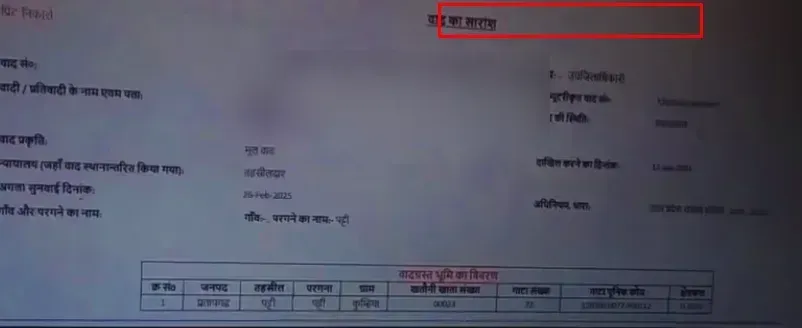
“No Record Found” — 7 Causes and Fixes
This is the most common frustration on Bhulekh: you enter everything correctly but get “No Record Found” or a blank result. Here is what causes it and how to fix each one.
1Village name is in Hindi
Villages are listed in Hindi alphabetical order. If you look for “Sarai” but the portal lists it as “सराय” or “सरायँ”, scrolling to “S” won’t find it. Look by the Hindi first letter. Tehsil boundary changes in 2020-2024 also moved some villages, so try the neighbouring tehsil.
2Disputed (vaad grast) land
Disputed plots sometimes don’t appear in the regular khatauni. Switch to the real-time khatauni and check the vaad grast listing.
3Mutation pending
While a mutation is being processed, the old record may be hidden from the regular view. The real-time khatauni shows the in-between state.
4Old records not digitised
Records from computerisation (2016) onwards are comprehensive. Very old records (before 2010) for some villages may be incomplete. Ask the tehsil office for the physical register.
5Wrong search method
The database is in Hindi, so type names in Hindi (Google Input Tools or your phone’s Hindi keyboard). Gata numbers were also renumbered during computerisation in some villages, so an old number may not match.
6Server issue
The portal slows down at peak hours and around the fasli year changeover. Try early morning (6-8 AM) or late evening. If the whole portal doesn’t respond, try again later.
7Wrong portal
Khasra nakal (fasli/crop records) is on ekhasra.up.gov.in, Bhu Naksha on upbhunaksha.gov.in, and revenue court cases on vaad.up.nic.in. Make sure you are on the right portal for what you need.
Certified Copy vs Free Copy — The Legal Distinction
The free khatauni from upbhulekh.gov.in is an informational copy, stamped “अप्रमाणित प्रति” (uncertified copy). Individual entries can show the digital signature of the Registrar Kanungo who recorded them, but that does not make the copy itself certified. The portal’s own disclaimer says the figures are for viewing only (मात्र अवलोकनार्थ). Banks, courts and sub-registrar offices generally need a certified copy (प्रमाणित नकल) for legal proceedings.
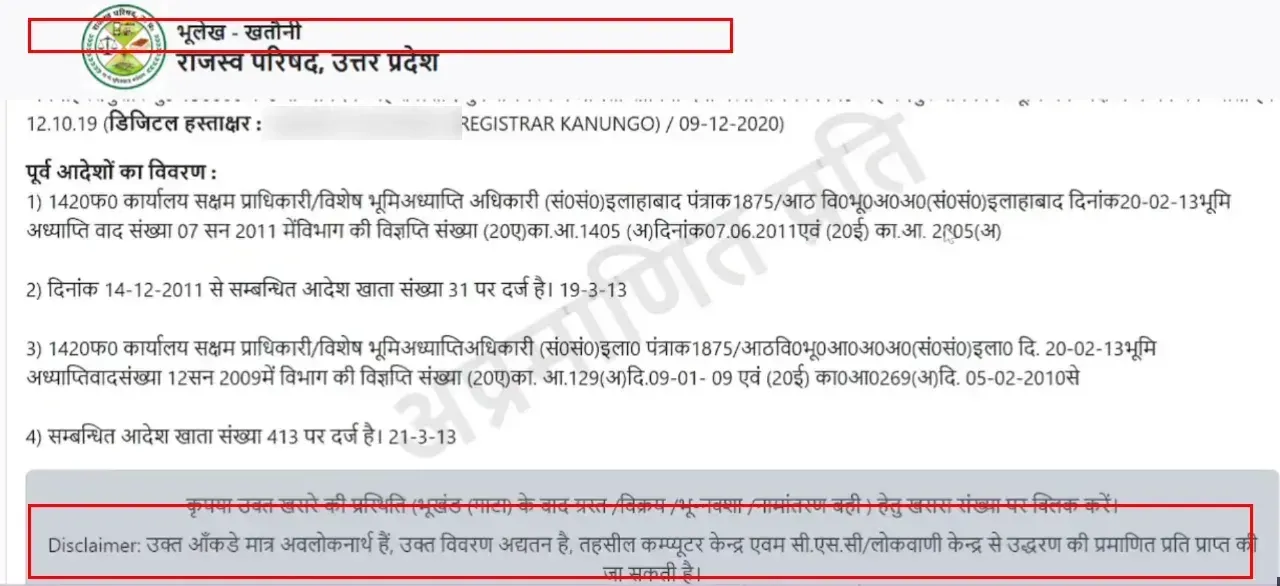
How to get a certified copy:
- Online: under “भूलेख सेवाएं”, choose “ऑनलाइन पेमेंट द्वारा खतौनी की प्रमाणित प्रति प्राप्त करें” (get a certified copy of the khatauni by online payment).
- In person: according to the portal’s disclaimer, certified copies are available from the tehsil computer centre and from CSC/Lokvani kendras. Take your Aadhaar and plot details.
- Registered login: registering on upbhulekh.gov.in is separate from viewing, and the login gives access to three advanced services: certified khatauni downloads, mutation applications and grievance submissions. After login, the system generates a digitally signed copy with a unique verification code. The “Login” menu has khatauni, real-time khatauni and khasra portal logins.
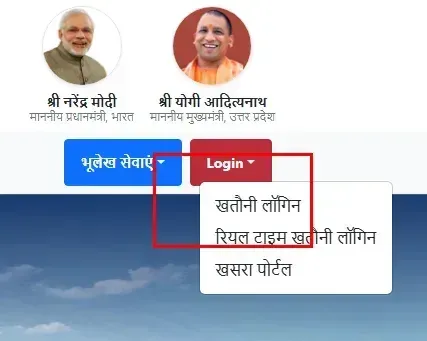
When the free copy is enough: personal reference, research before buying, an informal ownership check, verifying your own records, or preparing for a tehsil visit. For anything involving a legal proceeding, a financial transaction or a government submission, get the certified copy.
All UP Land Portals — Directory
Eight separate portals handle different parts of land records in UP. Knowing which does what saves you from searching on the wrong site.
| Portal | URL | What it does |
|---|---|---|
| UP Bhulekh | upbhulekh.gov.in | Khatauni, real-time khatauni, unique code, sale/dispute status |
| Bhu Naksha | upbhunaksha.gov.in | Land (cadastral) map with plot boundaries |
| E-Khasra | ekhasra.up.gov.in | Khasra nakal, fasli (seasonal crop) records |
| RCCMS / Vaad | vaad.up.nic.in | Revenue court cases, Varasat, namantaran, dispute status |
| Ansh Sanshodhan | upbhulekh.gov.in/ansh/ | Name or share correction in existing records |
| IGRSUP | igrsup.gov.in | Property registration (registry), stamp duty, marriage registration |
| Board of Revenue | bor.up.nic.in | Hub for all revenue services, the parent authority |
| Jansunwai (IGRS) | jansunwai.up.nic.in | The UP Chief Minister’s general grievance portal; also takes complaints about revenue officers |
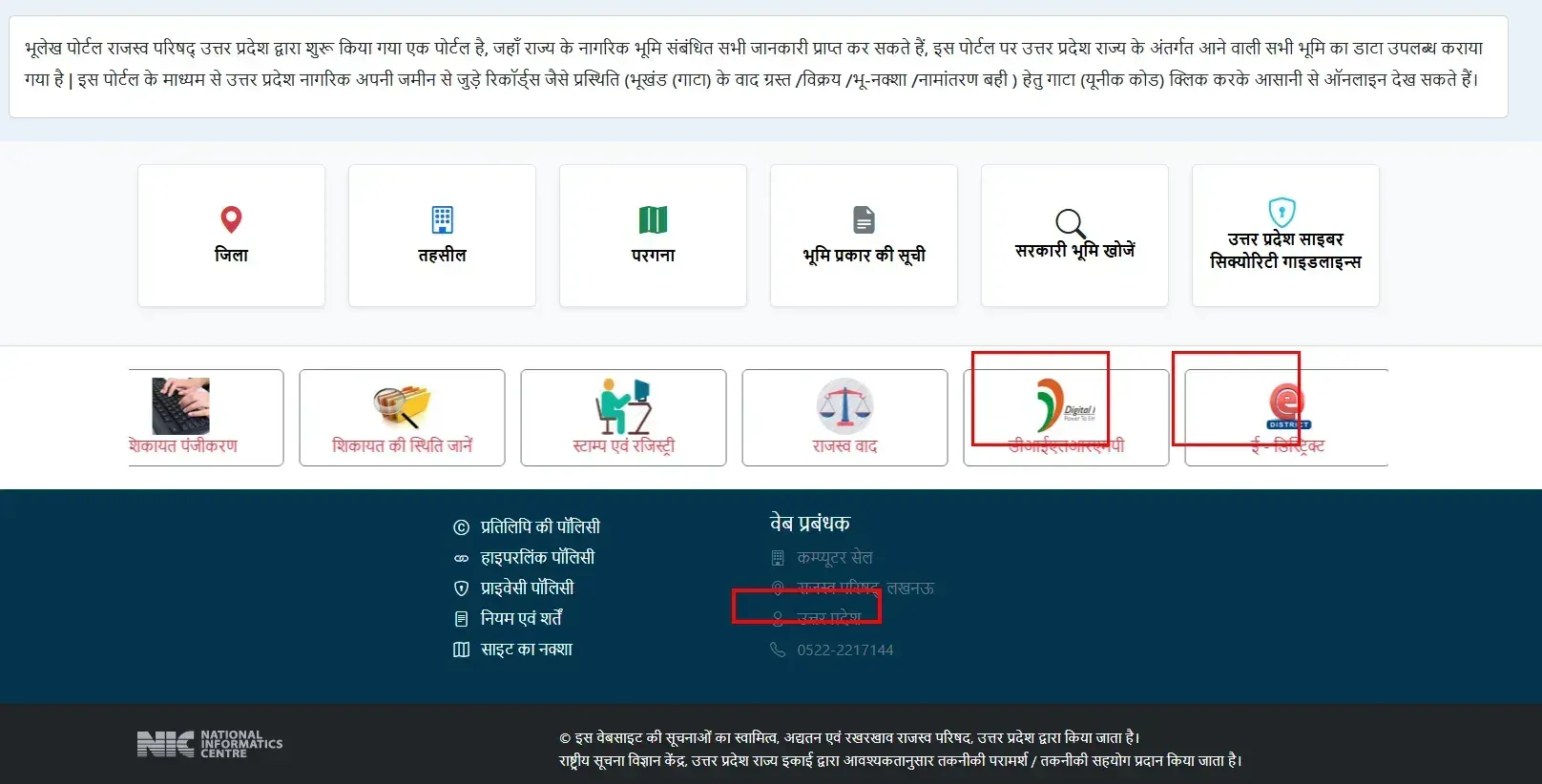
E-Khasra (ekhasra.up.gov.in) is often confused with Bhulekh but does a different job. Bhulekh shows ownership (who owns the land); E-Khasra shows crop records: which crop was grown on which plot in which fasli season, irrigation status (irrigated or unirrigated), soil type and agricultural use. Banks and agriculture departments check E-Khasra for crop loan verification and Kisan Credit Card applications.
Ansh Sanshodhan (upbhulekh.gov.in/ansh/) is the correction portal. If your name is misspelt in the khatauni, your father’s name is wrong or your share percentage is incorrect, apply for correction here. This is not a mutation (a change of owner) but a factual correction to an existing record. Submit it with supporting documents (Aadhaar, a marksheet, older records showing the correct details), and the Tehsildar processes the correction.
The Lekhpal Connection — Who Maintains These Records
Every land record on Bhulekh was originally created, and is still maintained, by one officer: the Lekhpal (लेखपाल). Posted at village level under the Revenue Department, the Lekhpal keeps the physical land registers that the portal digitises. When a mutation is approved, the Lekhpal updates the record. When a dispute arises, the Lekhpal files the field report. And when you apply for a certificate on eDistrict UP, the same Lekhpal visits your address to verify your income, residence or caste details.
UPSSSC is recruiting 7,994 new Lekhpals across Uttar Pradesh (Advt 02-Exam/2025; the Mains exam was held on 21 May 2026, and the Mains result and document verification followed in September 2026), a drive driven by the heavy workload from digitised land records and eDistrict certificate verification. The Lekhpal is the human link between the data on your screen and the land on the ground.
eDistrict Connection — Certificates That Need Bhulekh Records
Bhulekh and eDistrict UP are connected through two certificate requirements.
Haisiyat (solvency) certificate: applied for on the eDistrict eSathi portal, it proves your financial standing. The khatauni from Bhulekh is a mandatory supporting document, because it establishes your land ownership as part of your asset declaration.
Death certificate for Varasat: when a landowner dies, the Varasat (inheritance mutation) process on Bhulekh needs the death certificate from eDistrict. Without it, the Revenue Department won’t start the transfer to the legal heirs.
This two-way dependency, with eDistrict certificates needed for Bhulekh processes and Bhulekh records needed for eDistrict certificates, shows how closely UP’s revenue and administrative systems are linked.
Quick Reference
| Detail | Information |
|---|---|
| Official portal | upbhulekh.gov.in |
| Bhu Naksha portal | upbhunaksha.gov.in |
| E-Khasra portal | ekhasra.up.gov.in |
| Revenue court (RCCMS) | vaad.up.nic.in |
| Operator | Board of Revenue (Rajaswa Parishad), UP |
| Technical partner | National Informatics Centre (NIC) |
| Launched | May 2, 2016 |
| Framework | Digital India Land Records Modernization Programme (DILRMP) |
| Land parcels digitised | 2 crore+ |
| Agricultural land digitised | 95%+ (by 2025-26) |
| Registered users | 2.6 crore (2025) |
| Online khasra downloads | 12.5 crore (2025) |
| Coverage | All 75 districts, 358 tehsils |
| Khatauni types | Regular (fasli cycle) + real-time (live updates) |
| Free online copy | Informational, not certified |
| Certified copy | Online payment on the portal, tehsil computer centre, or CSC/Lokvani kendra |
| Namantaran filing | Recommended 30-45 days after the IGRSUP registry; no strict legal deadline (UP Revenue Code 2006, S.34-35; varasat under S.33) |
| Mutation notice and appeal | Tehsildar’s proclamation inviting objections (no fixed period in the Code); appeal to the SDM within 30 days of the order (S.35(2)) |
| Helpline | 0522-2217144 (upbhulekh.gov.in footer; some sites list 0522-2217145) |
| Complaint portal | jansunwai.up.nic.in (IGRS, the CM’s general grievance portal) |
Frequently asked questions
What is UP Bhulekh?
UP Bhulekh (upbhulekh.gov.in) is the official digital land records portal of Uttar Pradesh, operated by the Board of Revenue in collaboration with NIC. Launched on May 2, 2016 under DILRMP, it covers over 2 crore land parcels across 75 districts. The word "Bhulekh" means land record: Bhu (land) + Lekh (record).
Is UP Bhulekh free?
Yes. Viewing khatauni, khasra, real-time records, sale status and dispute status is completely free, and no login is needed to view them. Certified copies for legal use may involve a nominal fee through the portal or the tehsil office.
What is the difference between regular and real-time khatauni?
Regular khatauni updates on the fasli year cycle (annual). Real-time khatauni updates live as mutations are approved. For legal use, get a certified copy of the regular khatauni from the tehsil. To check the latest ownership, use real-time.
Is the online khatauni copy legally valid?
The free online copy is informational, for personal reference and preliminary verification. For court, bank, property transactions or government submissions you need a certified copy (praman patra): order it online on the portal by online payment, or get it from the tehsil computer centre or a CSC/Lokvani kendra.
How do I check if land is disputed (vaad grast)?
On upbhulekh.gov.in, open "भूखंड/गाटे के वादग्रस्त होने की स्थिति जानें", select district, tehsil and village, enter the khasra number and search. "वाद ग्रस्त" means an active revenue court case exists. "वाद ग्रस्त नहीं" means there is no dispute. Check vaad.up.nic.in for full case details.
My record shows "No Record Found". What should I do?
There are seven common causes: the village is listed in Hindi (not English), disputed land is in the separate vaad grast listing, a mutation is pending, old records are not digitised, the wrong search method was used, a server issue, or the wrong portal. Try real-time khatauni first, enter names in Hindi, and check the neighbouring tehsil if village boundaries changed. If nothing works, visit the tehsil office.
What is namantaran / dakhil kharij?
Mutation: updating the land record to show the new owner after a sale, inheritance, gift or partition. After buying land through an IGRSUP registry, apply for namantaran to the Tehsildar as early as possible. Under the UP Revenue Code, 2006, sale/transfer mutation is governed by Sections 34-35, and inheritance (varasat) by Section 33. The Tehsildar issues a proclamation inviting objections and then decides; his order can be appealed to the SDM within 30 days under Section 35(2). There is no strict legal deadline, but 30-45 days is the recommended window, and delay causes problems: the old name stays on the khatauni, and loans and permissions stall. For land inherited after a death, apply for Varasat with the death certificate from eDistrict.
What is vaad grast?
"Vaad grast" means the land is tied up in an active revenue court case, such as a boundary, ownership or inheritance dispute. Buying vaad grast land is risky because the court can change ownership regardless of your purchase. Always check before buying.
Where do I see the land map?
On upbhunaksha.gov.in, a separate portal from Bhulekh. Select district, tehsil and village, enter the khasra number and view the plot on the cadastral map. Click the plot to see its land type code in the sidebar; don't rely on map colours, which are not a fixed standard.
Who maintains Bhulekh records?
The Lekhpal, a village-level revenue officer under the Revenue Department. It is the same officer who verifies eDistrict certificate applications. UPSSSC is recruiting 7,994 new Lekhpals across UP (Advt 02-Exam/2025; Mains held 21 May 2026, with the Mains result and document verification in September 2026).
What is the official URL? Are other .com/.in sites real?
The only official portal is upbhulekh.gov.in. Sites such as upbhulekh.com, .net, .in or .org are unofficial information sites, not government portals. For official data, always check that the address ends in .gov.in.
How is Bhulekh connected to eDistrict?
In two ways. The haisiyat (solvency) certificate on eDistrict needs the khatauni from Bhulekh as supporting proof, and Varasat (inheritance mutation) on Bhulekh needs the death certificate from eDistrict. The Lekhpal who maintains Bhulekh records also verifies eDistrict certificate applications.